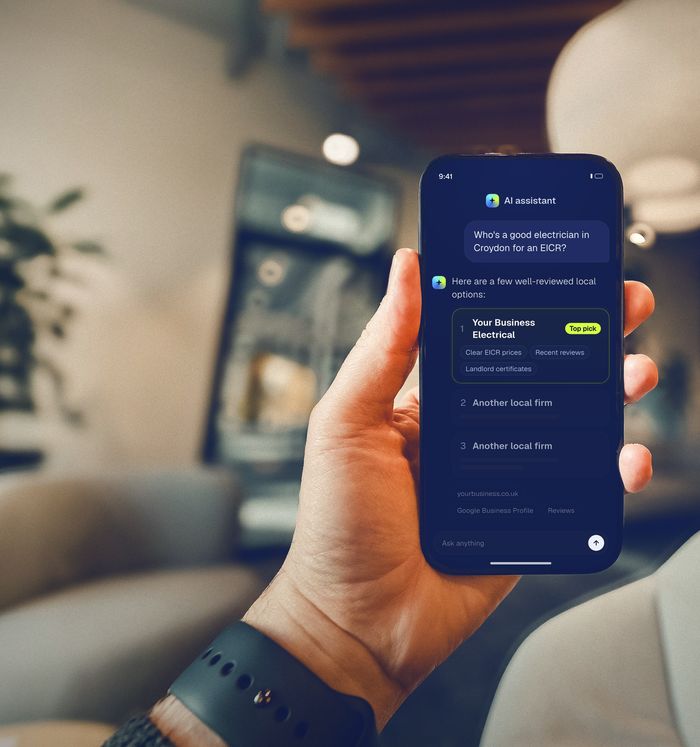
Google's AI Overviews and AI Mode build their answers from the normal Google index and your Business Profile, so there's no secret AI trick. To be included, your pages must be indexed and allowed to show a snippet, your Business Profile must be complete and accurate, and your site should state your services, towns, prices and credentials plainly in text. Check that nothing blocks Googlebot, keep structured data matching the page, and track results in Search Console.
Why AI Overviews matter for electricians
When someone in the UK searches Google for "who can fix a tripping RCD" or "EICR cost for a two-bed flat", there's a good chance the first thing they see isn't a list of links but an AI-written summary. Ofcom's Online Nation 2025 report found that about 30% of UK searches now show AI Overviews, and 53% of UK adults say they see these summaries often. Google Search itself is used by 82% of UK adults, with around 3 billion searches a month.
On top of that, Google launched AI Mode in the UK in July 2025: a separate tab in Google Search and the Google app where people ask longer, more detailed questions and get a conversational answer with links. Google says early AI Mode users ask questions two to three times longer than normal searches. Think "electrician near Reading who can fit an EV charger and upgrade my consumer unit at the same time, ideally next week".
For a local electrician, that changes the game in one important way: the customer may read a summary of their options before they ever see your website. If Google can't find clear, trustworthy information about you, you're less likely to be one of the names or links in that summary.
How AI Overviews and AI Mode pick what to show
Google has published a guide for site owners called AI features and your website. The key points, in plain English:
- They use the normal Google index. To be shown as a supporting link in an AI Overview or AI Mode, a page must be indexed and eligible to appear in Google Search with a snippet. Google says there are no extra technical requirements.
- They run lots of searches at once. Both features may use what Google calls "query fan-out": breaking a question into smaller searches across subtopics and data sources. A question about an EV charger and a consumer unit might trigger separate searches for each job, for your town, and for prices.
- They don't always appear. Google says AI Overviews only show when its systems decide they add something beyond the normal results, and AI Overviews and AI Mode can use different models, so the links they show will vary.
- Your Business Profile counts. Google's own checklist for AI features includes "checking that your Merchant Center and Business Profile information is up-to-date".
What Google says you don't need: new machine-readable files, "AI text files", special markup or special schema.org structured data. If someone offers to sell you a secret AI Overviews trick, that's a red flag.
7 checks to give yourself the best chance
None of these guarantee a mention (nobody can promise that), but they're exactly what Google says matters.
1. Make sure Google can actually crawl and index your site
Google lists "ensuring that crawling is allowed in robots.txt, and by any CDN or hosting infrastructure" as the first best practice for AI features. Open yourdomain.co.uk/robots.txt and check it doesn't block Googlebot. Then check any "bot protection" or "block AI crawlers" setting in your hosting, as some can be over-eager. The free Google Search Console will show you which of your pages are indexed and flag problems.
2. Don't switch off snippets by accident
Because AI features only link to pages that can show a snippet, a nosnippet or max-snippet:0 setting (sometimes added by a plugin or a previous web designer) will keep that page out. Google confirms that nosnippet, data-nosnippet, max-snippet and noindex are the controls that limit what appears in AI features. Unless you have a specific reason, your service pages should have none of them.
3. Think twice before blocking Google-Extended
Google-Extended is a robots.txt setting that controls whether Google can use your content to train Gemini models and for grounding answers in the Gemini app. Google says it doesn't affect your inclusion or ranking in Google Search. So blocking it won't hurt your AI Overviews, but it may mean the Gemini app is less able to draw on your site when someone asks it for a local electrician. For most small trade businesses that want to be found, leaving it open is the simpler choice.
4. Put the important facts in plain text
Google advises "making sure that important content is available in textual form". For electricians, that means the things customers ask about should be written on the page, not only shown in an image, a PDF price list or a Facebook post:
- each main service (EICRs, rewires, consumer unit upgrades, EV chargers, fault finding) with a short explanation
- the towns and postcodes you cover
- typical prices or "from" prices, if you're happy to share them
- your scheme membership (NICEIC, NAPIT or similar), with a link to your register entry
- call-out policy, working hours and whether you do emergency work
Because AI Mode breaks questions into smaller searches, a page that answers "how much does an EICR cost for a landlord in Swindon?" in one clear sentence is easier to use than a page that only says "contact us for a quote".
5. Finish your Google Business Profile
Your Business Profile is where Google gets your category, service areas, hours, phone number, photos and reviews. Set Electrician as the primary category, add every service, list up to 20 service areas, and keep your hours accurate. Our Google Business Profile checklist for UK electricians goes through it field by field, and our guide to getting more Google reviews the legal way covers the reviews side.
6. Keep structured data honest
Structured data is hidden code that labels your page for search engines. Google's local business documentation lets you use the specific Electrician type and recommends including your name, address, phone number with country code, URL and opening hours. The rule that matters most for AI features: Google says your structured data should match the visible text on the page. Don't mark up services, prices or reviews that visitors can't see.
7. Write for people, not for robots
Google's long-standing guidance on creating helpful, reliable, people-first content applies to AI features too. A short, genuinely useful page written by someone who does the work ("what happens during an EICR and how long it takes") beats a long page stuffed with town names and keywords.
Is Google's AI going to start phoning electricians?
You may have read that Google's AI can now call local businesses for customers. It's partly true. Google's Search help says AI Mode can help people research home services "such as electricians", check prices and availability, and, when a business has limited information online, call businesses on the customer's behalf. Google's Business Profile help says these automated calls are recorded, cost the business nothing, and are "currently available only in select regions and languages". The only region it names is the US.
So for now this mainly matters as a sign of where things are heading. Two practical points for UK electricians:
- Information online is the first port of call. Google says it calls when details aren't available online. Clear prices, availability and services on your profile and site are what an AI assistant uses first.
- You're in control. Verified profiles can switch automated calls on or off under the Business Profile's advanced settings, in the "Google automated calls and text messages" section. Google also says it never asks for payment or passwords on these calls, so treat anyone who does as a scammer.
How to see if it's working
Google says clicks from AI Overviews and AI Mode are included in the Performance report in Search Console, under the "Web" search type. They're not split out separately, so look at the overall trend for your service pages over a few months rather than day to day. Google also says clicks from results pages with AI Overviews tend to be "higher quality", meaning people spend more time on the site.
You can also check by hand: search Google for the questions your customers ask in your town, open the AI Mode tab, and note which businesses and pages are linked. Ask each question a few times with different wording, because AI answers vary. If you'd like us to do it properly across Google, ChatGPT, Copilot and Perplexity, see our AI & Google Visibility Check or read how to get recommended by ChatGPT.
Frequently asked questions
Can I pay to appear in Google's AI Overviews?
No organic AI Overview placement is for sale. Google says the same SEO fundamentals apply and there's no special optimisation required. Be wary of anyone who guarantees a spot.
Do I need an llms.txt file or special schema for AI Overviews?
No. Google's own guide says you don't need new machine-readable files, AI text files or special schema.org structured data to appear in AI Overviews or AI Mode. Standard, accurate Electrician or LocalBusiness markup is still worth having for normal search.
Will blocking AI bots stop me appearing in AI Overviews?
It depends which bot. AI Overviews and AI Mode use Googlebot, so blocking Googlebot would remove you from Google Search altogether. Blocking Google-Extended doesn't affect Google Search, but it limits how the Gemini app can use your content.
How long do changes take to show?
Google says crawling can take anywhere from several days to several months, depending on how often it revisits a page. Business Profile edits are usually quicker. Check again after about a month.
Sources
- Ofcom, From apps to AI search: how the UK goes online in 2025, Online Nation report, 10 December 2025.
- Google, Introducing AI Mode in the UK, 28 July 2025.
- Google Search Central, AI features and your website.
- Google Crawling Infrastructure, Google's common crawlers (including Google-Extended).
- Google Search Central, Local business structured data.
- Google Search Central, Creating helpful, reliable, people-first content.
- Google Search Help, Use AI Mode to check local availability and pricing.
- Google Business Profile Help, About automated calls and texts from Google to your business.
- Google Business Profile Help, Manage your service areas.