AI assistants recommend the electricians they can find clear, consistent, trustworthy information about. To be named more often, complete your Google Business Profile (and Bing Places), give each main service and town its own clear wording on your website, collect recent reviews, make your details match everywhere, add structured data and make sure AI crawlers aren't blocked. Nobody can guarantee a mention, but these fixes give you the best chance.
Why this matters now
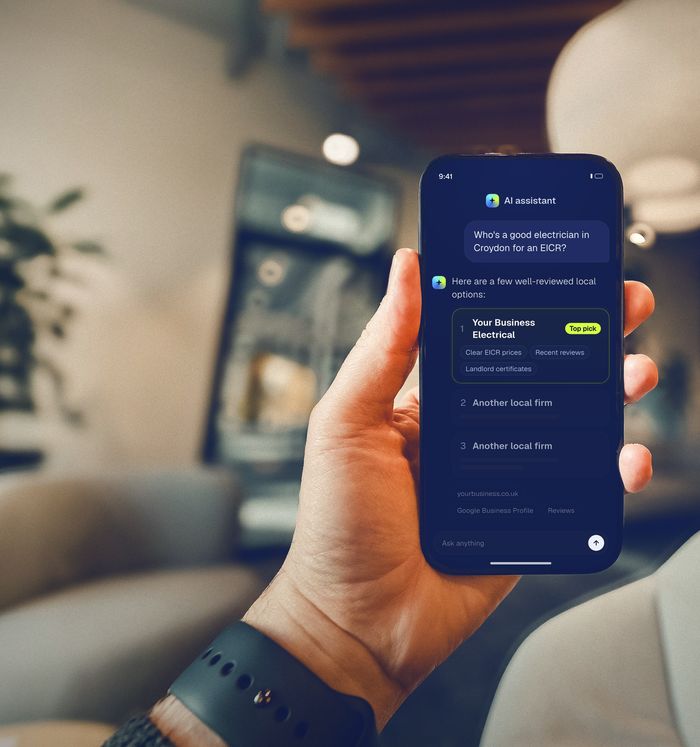
More of your customers are skipping the search results page and asking an AI assistant instead: “Who’s a good electrician near me for an EICR?” or “Can anyone fit an EV charger in Bromley this week?”. The assistant replies with a short list of names. If you’re not on it, you’re not in the running.
The numbers are moving quickly. In Yext’s 2026 study of 600 UK consumers, 36.7% had used AI for local search in the past month, and 75% of those AI users said they were using it more than a year earlier. ChatGPT was the most-used tool, followed by Google Gemini and Microsoft Copilot. OpenAI now says ChatGPT reaches 1.2 billion people a week, and Google says its AI Overviews have more than 2.5 billion monthly users.
The good news: AI tools don’t pick names at random. They repeat what they can find and trust about local businesses online. That’s something you can improve.
How AI assistants choose which electricians to name
Each tool works a little differently, but they all draw on the same kinds of sources:
- Search indexes. ChatGPT search draws on OpenAI’s own crawler (
OAI-SearchBot) and third-party search providers. Copilot is built on Bing. Google’s AI Overviews, AI Mode and Gemini use Google’s index. Perplexity searches the web in real time and shows its sources. - Business listings. Your Google Business Profile, Bing Places listing and Apple Business Connect entry: categories, services, service areas, hours, reviews.
- Your website. Especially pages that clearly say what you do, where, and for how much.
- Third-party mentions. Trade directories, review sites, scheme registers (NICEIC, NAPIT), local news and community pages.
When those sources agree (same name, same number, same services, same towns, plenty of recent reviews), an AI tool can confidently say “X Electrical in Croydon is well reviewed for EICRs”. When they’re thin or contradictory, it names someone else.
Google’s own advice: there are no special tricks for its AI features. Google says the same SEO fundamentals apply, and that you don’t need new machine-readable files, “AI text files” or special schema to appear in AI Overviews or AI Mode. Be wary of anyone selling secret AI hacks.
9 things you can fix this month
1. Finish your Google Business Profile
This is the single most important listing for local AI answers in Google and Gemini. Set your primary category to Electrician, add every service you offer, list the towns you cover as service areas (Google allows up to 20), keep your hours accurate, write a plain-English description, and add real photos of your work and van. Our Google Business Profile checklist for UK electricians goes through it field by field.
2. Don’t forget Bing Places and Apple Business Connect
Microsoft Copilot is built on Bing, and Yext’s UK study found Copilot was one of the three most-used AI tools for local search. Claim your free Bing Places for Business listing (you can import from Google) and your Apple Business Connect listing, which feeds Apple Maps and Siri. Make the details identical to your Google profile.
3. Give each main service its own clear wording
If your website lumps EICRs, consumer units, EV chargers and rewires into one paragraph, an AI tool can’t easily match you to a specific question. Give each main service its own page, or at least its own clearly headed section, that says what it is, who it’s for (homeowners, landlords, businesses), roughly what it costs, and how long it takes.
4. Name the towns you actually cover
“Greater London and surrounding areas” tells nobody that you cover Sutton, Cheam and Purley. Name your main towns on your website and in your Google service areas. If you cover several towns and want work in each, a short, genuinely useful page per area (not a copy-and-paste with the town name swapped) helps.
5. Get more recent, detailed reviews
AI answers love phrases like “highly rated” and “quick to respond”, and they can only say that if your reviews back it up. Recency matters to customers too: in BrightLocal’s 2026 survey of US consumers, 74% said they only care about reviews written in the last three months. Ask every happy customer, make it easy with a direct review link, and reply to every review. Our guide to getting more Google reviews the legal way has message templates.
6. Make your name, address and phone match everywhere
Check Checkatrade, TrustATrader, MyBuilder, Rated People, Yell, Bark, Facebook and your scheme register entry. Old mobile numbers, previous trading names and different addresses make you look less certain to customers and machines alike. Fix or close duplicates.
7. Add structured data to your website
Structured data (schema.org markup) is a hidden label that tells search engines “this is an Electrician, these are its services, this is where it works, these are its hours”. Use the Electrician type (a kind of LocalBusiness), and add FAQPage markup to a genuine FAQ. The golden rule from Google: markup must match what people can see on the page.
8. Make sure AI crawlers can read your site
Some hosting and security services can block AI crawlers, sometimes with a single setting. OpenAI says sites that block OAI-SearchBot won’t be shown in ChatGPT search answers. Check your robots.txt file (yourdomain.co.uk/robots.txt) and any “block AI bots” setting in your hosting or CDN. At minimum, allow Googlebot, Bingbot, OAI-SearchBot and PerplexityBot. Blocking training-only bots like GPTBot is a separate choice.
9. Answer the questions customers actually ask
AI tools quote pages that state facts plainly. Add a short FAQ that answers what you’re asked on the phone every week: Do you charge a call-out fee? How long does a full rewire take? Do I get a certificate? Are you NICEIC or NAPIT registered (with a link to your register entry)? Do you cover evenings and weekends?
How to check what ChatGPT says about you
You can do a rough check yourself in ten minutes:
- Open ChatGPT (with search turned on), Google, Copilot and Perplexity.
- Ask the questions your customers ask, in your town: “best electrician in [town] for an EICR”, “emergency electrician [town]”, “who installs EV chargers in [town]?”.
- Ask each question two or three times, and try slightly different wording. AI answers vary, so one screenshot proves very little.
- Note who gets named, what the answer says about them, and which sources it cites. Those sources are your to-do list.
If you’d rather we did it properly (10–15 questions across four tools, each asked more than once, plus a full audit), that’s our £95 AI & Google Visibility Check. Or start with a free mini-check.
What not to do
- Don’t buy or write fake reviews. They’ve been illegal in the UK since 6 April 2025 under the Digital Markets, Competition and Consumers Act 2024, and they break Google’s policies.
- Don’t stuff keywords into your business name on Google (“Smith Electrical Croydon Emergency Electrician EICR”). It’s against Google’s guidelines and can get your profile suspended.
- Don’t claim accreditations you don’t hold. Scheme badges are for registered businesses only.
- Don’t expect an llms.txt file to fix things. It’s a harmless optional proposal, but Google says you don’t need AI text files, and it won’t make up for a thin website or an incomplete profile.
- Don’t trust anyone who guarantees a ChatGPT recommendation. Nobody controls what AI tools say.
Frequently asked questions
Can I pay to be recommended by ChatGPT?
Not in its answers. ChatGPT now carries clearly labelled ads, but OpenAI says advertising does not influence the answers ChatGPT provides. Recommendations are based on what the tool can find and trust about businesses online, so improving that information is the honest route.
How long does it take to start appearing in AI answers?
It varies. Google Business Profile changes can be reflected within days. Website changes depend on when search engines and AI crawlers next visit your pages, which can take from days to a few months. Re-check after about 30 days.
Do I need a separate page for every town?
Not necessarily. Name your towns clearly on your site and in your Google service areas first. Separate area pages help if you genuinely want work in several towns and can say something useful about each one, but thin pages with only the town name changed can do more harm than good.
Sources
- Yext, 2026 Consumer Search Behaviours: How UK Consumers Navigate Local Search in the Age of AI, June 2026 (UK sample of 600 consumers).
- OpenAI, Building advertising for the way people use AI, 5 October 2026.
- Alphabet, Investor presentation, June 2026.
- Google Search Central, AI features and your website.
- OpenAI, Overview of OpenAI crawlers.
- Google Business Profile Help, Manage your service areas.
- BrightLocal, Local Consumer Review Survey 2026 (US sample of 1,002 adults).
- Competition and Markets Authority, Fake reviews guidance (CMA208), April 2025.